How to schedule a flow
Add schedule= to the flow and serve it. The server creates runs at each fire time; nothing fires offline.
Declare the schedule in code
from datetime import date, timedelta
from cereyan import flow, Cron, Interval

@flow(schedule=Cron("30 6 * * *", timezone="Europe/Istanbul"))
def morning_load(day: date = date.today()) -> str:
    return str(day)

@flow(schedule=Interval(timedelta(minutes=15)), max_concurrent=1, on_overlap="skip")
def poll_queue() -> None:
    ...

assert morning_load.schedules[0]["kind"] == "cron"
assert poll_queue.schedules[0]["interval"] == 900
Then:
The flow page shows the schedule summary and next fire time, the Upcoming tab lists the runs materialised ahead, and the dashboard's Upcoming panel shows the next fires across flows.
Pick the kind
| Want | Declare |
|---|---|
| Wall-clock times | Cron("0 9 * * 1-5", timezone="Europe/Istanbul") |
| Every N seconds or minutes | Interval(timedelta(minutes=15)); add anchor=datetime(...) to align the grid |
| Calendar rules | RRule("DTSTART:20260101T090000\nRRULE:FREQ=MONTHLY;BYDAY=-1FR", timezone="UTC") |
| Again and again, a while after each run ends | Continuous(delay="30m"); see Continuous schedules |
Several schedules can be given as schedules=[...]. Each takes catchup (skip, latest, all) and catchup_max for what happens to fires missed while the server was down.
Keep runs from piling up
A slow flow on a fast schedule needs a policy. max_concurrent=1 with on_overlap="skip" drops a fire while the previous run is still going; "enqueue" (the default) lets it wait; "cancel_new" records it as cancelled. See Limit concurrency and overlap.
Pause and resume
Pause from the flow page, POST /api/schedules/{id}/pause, the MCP pause_schedule tool, or a rule's pause_schedule action. Pausing removes the schedule's not-yet-started runs; resuming materialises them again. disable_after=(count, window, persist) pauses automatically after repeated failures; a window of None counts failures in a row. Pausing a Continuous schedule stops its loop: the waiting run is removed and a running one finishes without a successor.
Skip a run
To stop one run without pausing the schedule, open the flow's menu on the Flows page: Skip next run skips the next fire, and Skip runs… opens a checklist of upcoming fires filled by a Skip the next N stepper or an Until a time field, with the time the schedule resumes and the flows after this one that are skipped too.
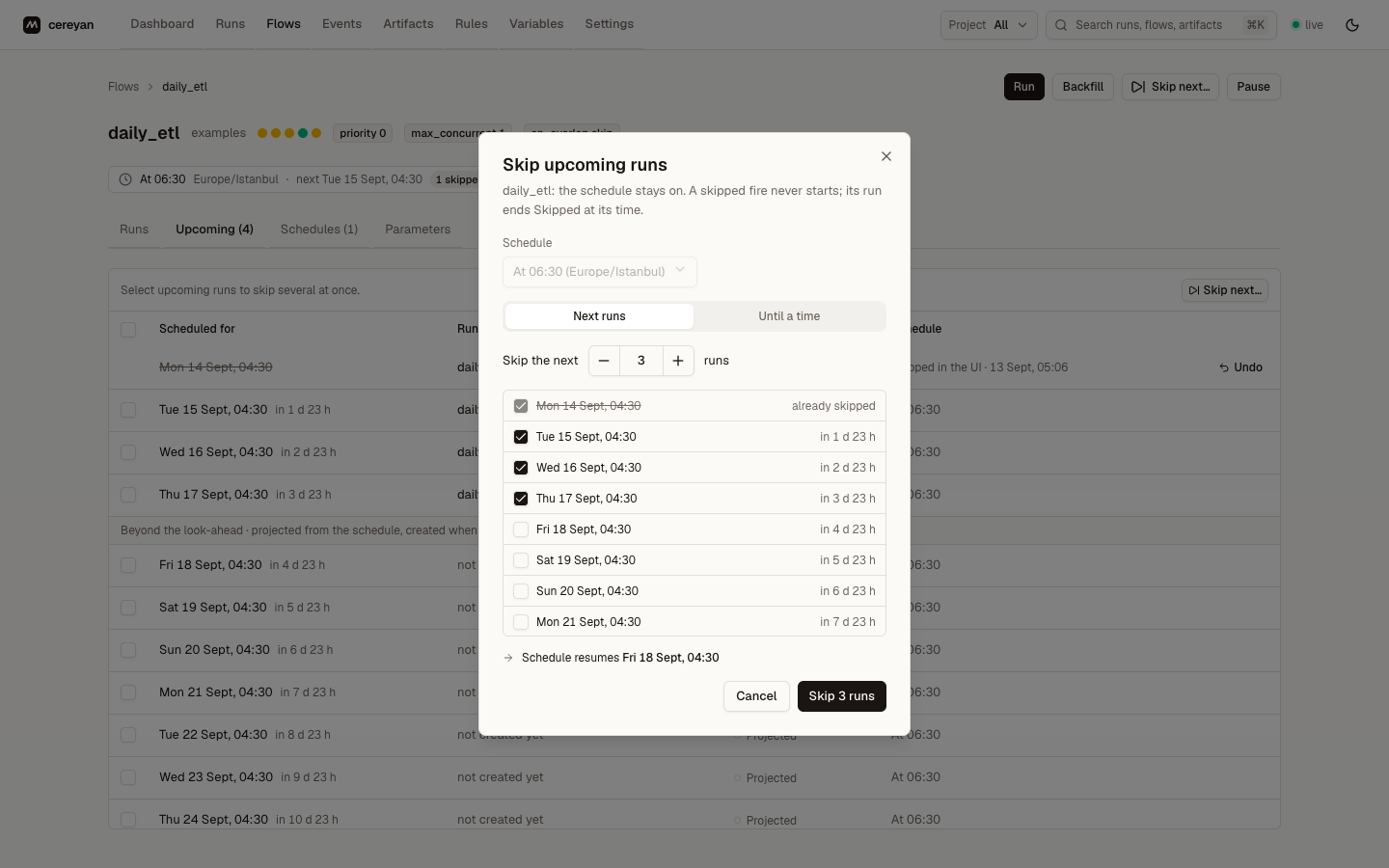
The flow page's Upcoming tab does the same row by row, for several rows at once, or for all of them with the header checkbox, and lists fires past the materialised runs as projected so you can skip one days ahead. A skipped fire shows who skipped it and when; at its time it ends Skipped without starting, and so do the runs of the flows declared after= it. Undo takes a skip back until its time. See Skipping fires.
Run once, later
A one-off run for later needs no schedule. POST /api/flows/{id}/runs and POST /api/runs take delay (seconds) or scheduled_time (microseconds), and the run waits as Scheduled with that time, listed under the flow's upcoming runs, until it is due; it pre-warms an engine, can be marked Late, and is held by a global pause like a schedule fire. A time already past starts the run at once.
run = served.client.run("etl", day="2026-03-02", delay=600)
assert run["state"]["type"] == "Scheduled" and run["scheduled_time"]
served.client.cancel(run["id"])
Client.run(..., at=datetime | ISO string) names the time instead. From a shell, cereyan run pipeline.py:etl --in 10m or --at 2026-09-21T03:00:00Z hands the run to the running server rather than executing it, and prints the run's id and start time (--json for the run). A rule's run_flow action takes delay, an agent's run_flow tool takes at or delay_seconds, and the flow page's run dialog has a "Start at" field.
Inspect through the API
flow = next(f for f in served.client.flows() if f["name"] == "daily_etl")
schedules = served.client.schedules(flow["id"])
assert schedules and schedules[0]["schedule"]["kind"] == "cron"
upcoming = served.client.upcoming(flow["id"])
assert len(upcoming) >= 1
Edit at runtime
Reschedule…, in the Flows page menu and beside the schedule summary on the flow page, edits a cron schedule as a daily, weekly, or monthly time in a timezone, or as raw cron, with its catch-up options, and shows the coming week before and after the change with what saving replaces and the skips it would drop.
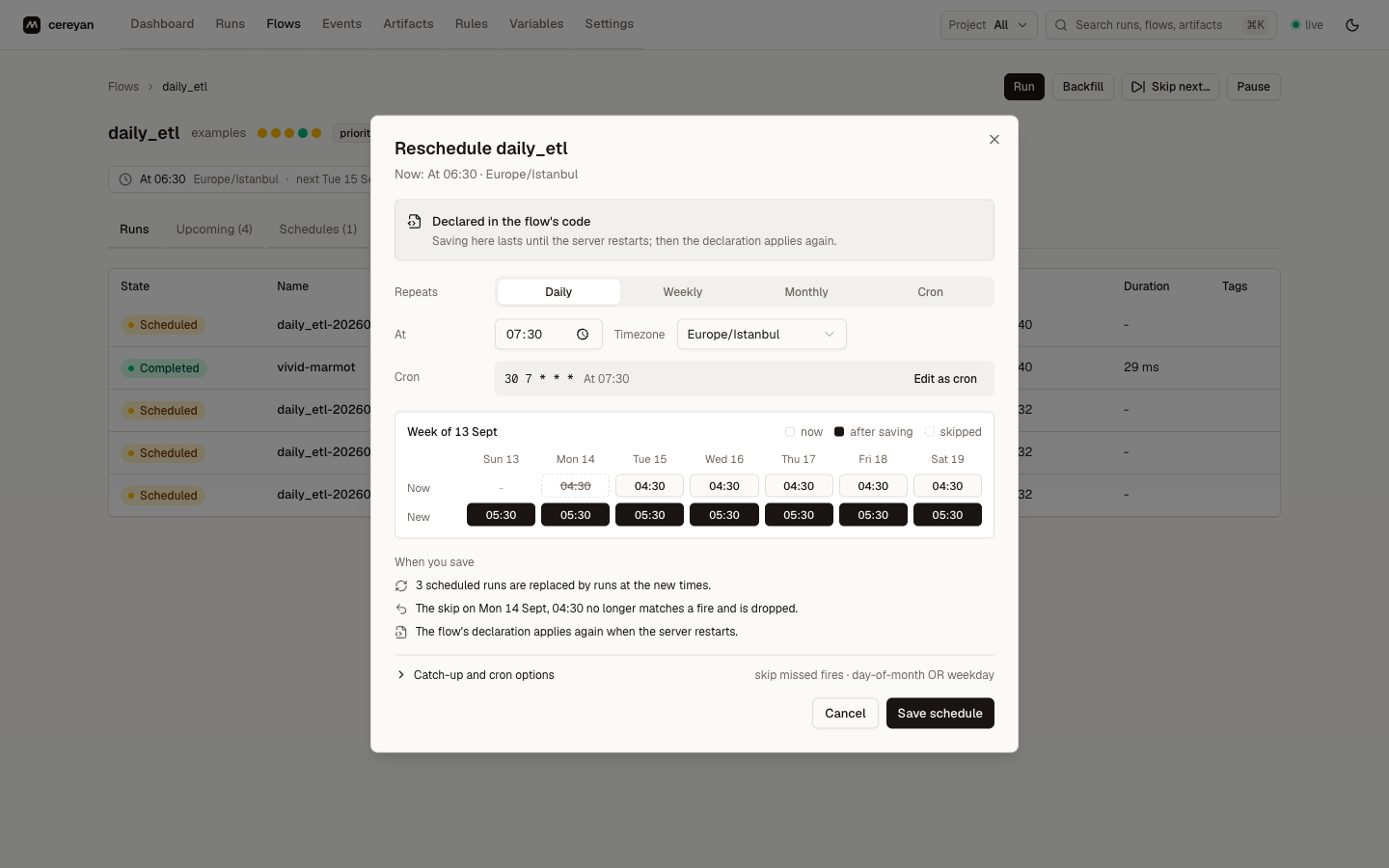
Interval and RRule schedules open in the Schedules tab's editor, which previews the next fire times (POST /api/schedules/preview). An edit to a code-declared schedule lasts until the next restart re-applies the declaration, unless the request sets persist: true.
Related: Schedules, Backfill a date range.