How to run across machines
cereyan worker adds another machine's processors to a server's queue. The worker runs its own checkout of the project, connects out to the server, and takes the runs the server's own processors cannot take right now. The server keeps everything else: the store, the flow definitions, the schedules, results, and secrets.
 worker B ──HTTPS──► proxy (TLS) ──HTTP──► cereyan serve (A)
   │                                          │ one queue, one store, results, secrets
   ├ register, heartbeat (commands back)      │ processors: server, B, C…
   └ engines ── work, reports, heartbeats ────┘
Before you start
- The server needs a token. A server without one refuses workers, even when it is bound to loopback behind a proxy on the same machine. Start it with
--tokenor set[server] token(see Secure the server). - Each worker has its own checkout of the same project, deployed the way you deploy the server's, for example with
git pull. The server does not ship code. - The same Python environment: the worker's engines import your modules and their dependencies.
- Network access from the worker to the server over HTTP or HTTPS. The worker opens one port of its own, a read-only status page, on
127.0.0.1unless you say otherwise.
Start a worker
On the worker machine, in its checkout:
export CEREYAN_TOKEN=...            # the server's token
cereyan worker . --host https://cereyan.corp.internal --processors 4 --name gpu-1
It imports the checkout as serve does, registers, and appears on the server's Queue › Workers tab within one heartbeat, five seconds at most. The same settings can live in the checkout's cereyan.toml:
[worker]
host = "https://cereyan.corp.internal"
name = "gpu-1"
processors = 4
labels = { gpu = "true", zone = "eu" }
shared_paths = ["/mnt/lake"]
token_file = "/etc/cereyan/token"
status_host = "127.0.0.1"   # the status page; the default
status_port = 0             # a port the OS picks; the default
--processors is at most the worker's CPU count and can be changed later from the Workers tab. Labels are shown there; they do not route work.
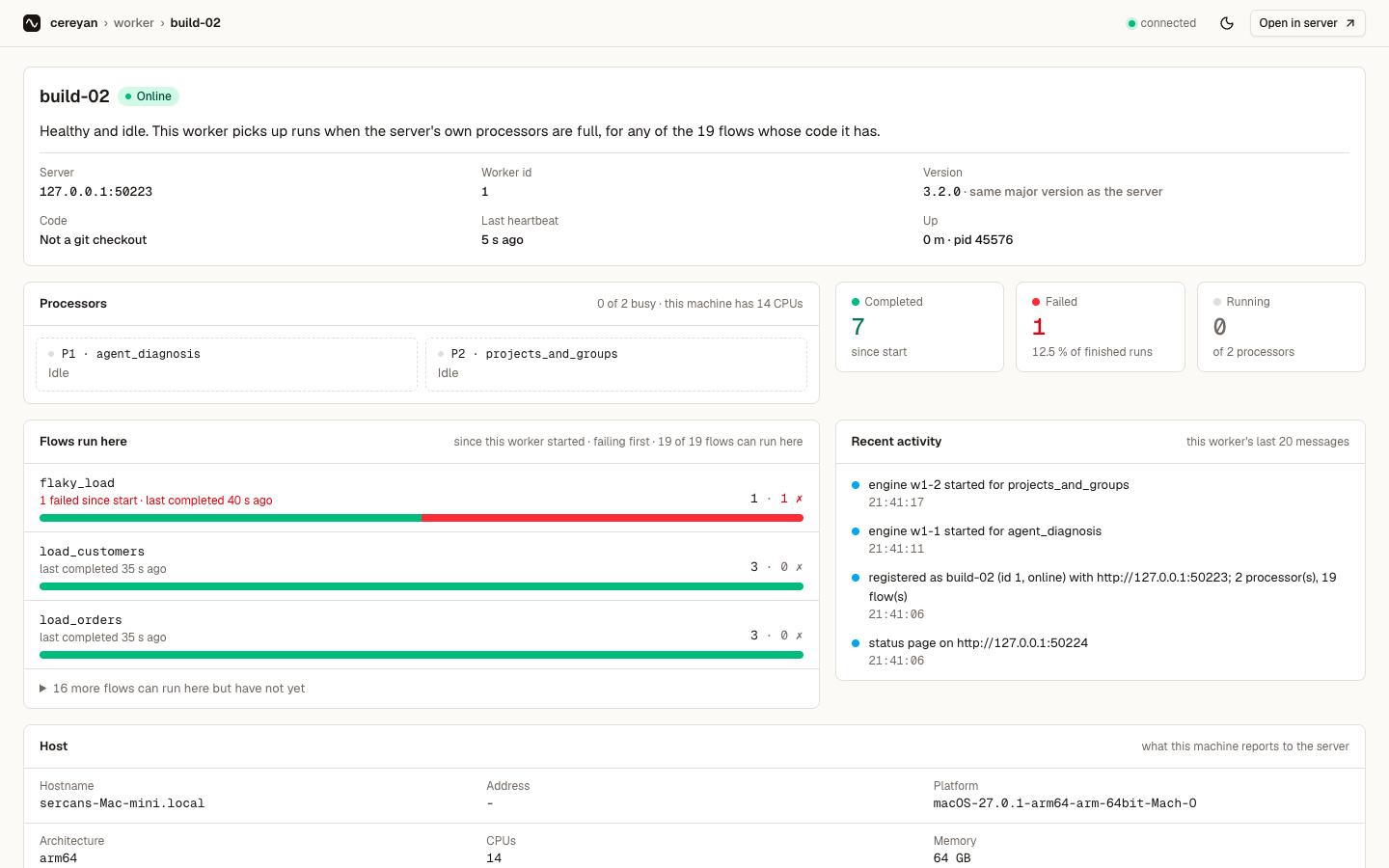
Each worker serves a read-only status page, styled like the rest of the UI, and logs its address at start (status page on http://127.0.0.1:51377); the Workers tab shows it too. The page opens with a sentence saying whether the worker is healthy and busy, then its server, version, code, last heartbeat and uptime, its processors, runs completed and failed since it started, the flows it has run with failing ones first (the rest folded into one line), its recent messages and its host details. It keeps working when the server cannot be reached. status.json returns the same data, and healthz answers 503 after three missed heartbeats, for a service manager or load balancer. Choose the address with --status-host and --status-port. Links on the page are relative, so a reverse proxy can serve it under any path. The page has no controls and no login. It shows the checkout path, git state, flow names and host details, so bind it beyond loopback only behind a proxy that controls access.
Which runs go to a worker
Any run can: one a schedule, a rule, the API, an agent, or a backfill created. The server's own processors take runs first. When they are full, the server asks a worker with a free processor to start an engine for the run's module, and that engine takes the first run in line it may take. A worker takes a run only when:
- the flow allows it:
@flow(runs_on="server")keeps a flow on the server's machine; - the worker's code for the run's module matches the server's (its fingerprint), so a worker whose checkout is behind takes none of that module's runs until it is updated; the Workers tab names the modules that differ;
- the worker is online and not draining.
A resumed run, a wait_for_target poke, or a crash rerun prefers the worker that ran the previous attempt for ten seconds, then any host may take it. Every run records where it ran: the Runs list has a Host column, the server or the worker's name with the processor slot, the run page says the same in its header, and both link to the Workers tab.
Files, results and secrets
- Results, cache entries and checkpoints are stored on the server, through its API, so a run rerun on another host replays the same checkpoints. Nothing is written under the worker's home.
- Secrets are decrypted by the server and sent to the worker's engines over the authenticated connection. The key never leaves the server.
- Files your tasks write are on the machine that ran them. A worker's engines start in its checkout, so a relative path means the same place it means on the server, but it is a different disk. Put shared data on storage every machine mounts at the same path, in a database, or in object storage, and declare the mount with
--shared-path. ALocalTargetoutside every shared path is reported once per path asrun.local_path_on_workerand in the run's log; nothing fails. A flow that must read or write the server's own files should sayruns_on="server".
Behind a proxy with TLS
The server does not terminate TLS; put it behind a reverse proxy that does. The worker and its engines verify the proxy's certificate with the trust store in SSL_CERT_FILE and SSL_CERT_DIR, as curl and Python do; install your CA there on each worker, as on the server. There is no option to turn verification off.
location /cereyan/ {
    proxy_pass              http://127.0.0.1:4200/cereyan/;
    proxy_http_version      1.1;
    proxy_read_timeout      75s;   # an engine's request for work waits up to 30 s
    client_max_body_size    8m;    # results are uploaded in chunks of 4 MB
    proxy_buffering         off;
    proxy_set_header        Host $host;
    proxy_set_header        X-Forwarded-For $remote_addr;
}
Start the server with --base-path /cereyan and the worker with --host https://proxy.corp.internal/cereyan. The Workers tab shows the address the proxy reports in X-Forwarded-For.
Drain, stop and forget
- Drain on the Workers tab, or
POST /api/workers/{id}/drain: the worker takes no new run; its current runs finish. Resume puts it back. - Stopping the worker process (
SIGTERM, Ctrl-C) drains it and exits once its runs end, turning offline at once; started again, it comes back online, unless you had drained it before the stop. A second signal leaves running engines to finish on their own. - A worker that stops heartbeating is offline after three missed heartbeats, and
worker.offlineis recorded. Runs it held are crashed and rerun elsewhere by their own heartbeats. - Forget removes an offline worker's record. A worker that comes back registers again under its name.
What happens after a network split
Every hand-off of a run to an engine carries a lease. When a worker loses the network, its run is crashed and rerun on another host; if the first engine reconnects, the server refuses its reports as stale and the engine stops. The rerun's results are the ones recorded. A task that already wrote outside the store before the split may have written twice; targets keep such writes idempotent.
Run a worker as a service
As for the server (Run the server as a service), with ExecStart=/srv/pipelines/.venv/bin/cereyan worker /srv/pipelines and the token in the environment file. Restart=always is safe: a restarted worker registers again under the same name.